See the Kinesis Programming Guide for all keyboard token definitions and (a little) programming help and examples.
Special tokens
| Token | Description |
|---|---|
| {x1} | Disables multi-play. Usually a good, defensive thing to do. |
| {sn} where n = 1-9 | Playback speed. 6 is usually a safe number. |
Emit an uppercase value
This example shows how to produce a US dollar sign ($) (which is the upper case 4 key.) Use this pattern for any upper-case value.
{-lshft}{4}{+lshft}
where {-lshft} is the shift key down action, {4} is the 4 key, and {-lshft} is the shift key up action.
To assign a macro:
Macros use braces to surround the key identifier. The key identifier is followed by > to assign a macro to a key. This assigns a macro to hk1.
{hk1}>...tokens here as needed
You can also assign a modifier. This assigns a macro to left shift/hk1. (The Windows key isn't recommanded as a modifier key.)
{lshft}{hk1}>...tokens here as needed
Keyboard remapping
Keyboard remapping uses braces to surround the key identifier. Like macro assignment, the key identifier is followed by > to assign a remap. This reassigns the hk0 key to the escape key.
[hk0]>[esc]
Special case function key assignment
Most most macros are triggered first with Kinesis FN key. To press that key without taking my fingers off of the home row, FN is assigned to the Caps Lock with this:
[caps]>[fnshf]
fn [caps]>[fnshf]
To make it easier to press the Windows key from the home row, this macro:
fn [n]>[lwin]
assigns the Windows to the FN/n keystroke combo, with my keyboard map, is CapsLock/n.
Kinesis keyboard tokens
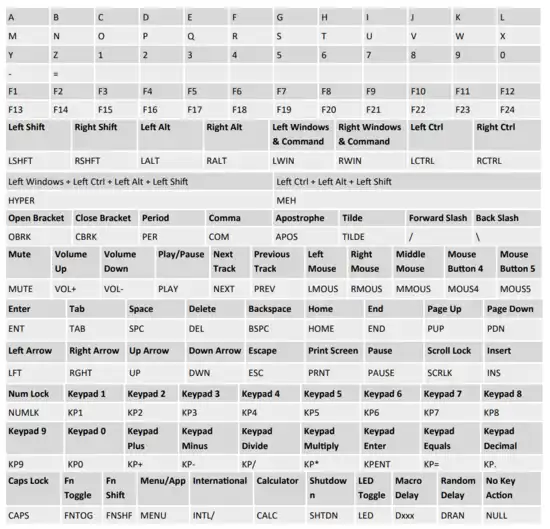
Layout1.txt file
[caps]>[fnshf]
fn [caps]>[fnshf]

* Specials
* h = `|`

* Pairs
* j = {}
* k = []
* l = ()
* Singles
* u = +
* y = $
* i = *
* : = dash
* ' = underscore

* Function keys

* fn 7 = home key
fn {7}>{x1}{s3}{home}

* fn 8 = end
fn {8}>{x1}{s3}{end}

* fn h = two tilde with cursor between them
fn {h}>{s5}{x1}{tilde}{tilde}{lft}

* fn j = two braces with cursor between them
fn {j}>{x1}{s3}{-lshft}{obrk}{+lshft}{-lshft}{cbrk}{+lshft}{lft}

* fn k = two brackets with cursor between them
fn {k}>{x1}{s3}{obrk}{cbrk}{lft}

* fn  l = two paranthesess with cursor between them
fn {l}>{x1}{s3}{-lshft}{9}{+lshft}{-lshft}{0}{+lshft}{lft}

* fn : = minus sign
fn [colon]>-

* fn ' = underscore
fn {apos}>{x1}{s6}{-lshft}{hyph}{+lshft}

* fn y = dollar sign
fn {y}>{x1}{s3}{-lshft}{4}{+lshft}

* fn u = plus sign
fn {u}>{x1}{s3}{-lshft}{=}{+lshft}

* fn i = asterisk
fn {i}>{x1}{s3}{-lshft}{8}{+lshft}

* fn o = ctrl/s (save)
fn {o}>{x1}{s3}{-lctrl}{s}{+lctrl}

* fn m = ctrl/a (select all)
fn {m}>{x1}{s3}{-lctrl}{a}{+lctrl}

* fn
fn [n]>[lwin]

* Kinesis keys
* HOT KEYS

* hot key 0 = escape
[hk0]>[esc]

* hot key 0 = ctrl/a (save)
{lctrl}{hk0}>{x1}{s3}{-lctrl}{s}{+lctrl}

* hot key 1 = ctrl/c (copy)
{hk1}>{x1}{-lctrl}{c}{+lctrl}

* left ctrl/hot key 1 = ctrl/a (copy all)
{lctrl}{hk1}>{x1}{-lctrl}{a}{+lctrl}

* hot key 2 = ctrl/v (paste)
{hk2}>{x1}{-lctrl}{v}{+lctrl}

* ctrl/left shift v (unformatted paste)
{hk4}>{x1}{s6}{x1}{-lctrl}{-lshft}{v}{+lshft}{+lctrl}

*{hk5}>{s3}{x1}{tilde}{tilde}{tilde}{ent}
*{hk6}>{s6}{x1}{tilde}{tilde}{tilde}{ent}{d125}{tilde}{tilde}{tilde}{home}{ent}{up}